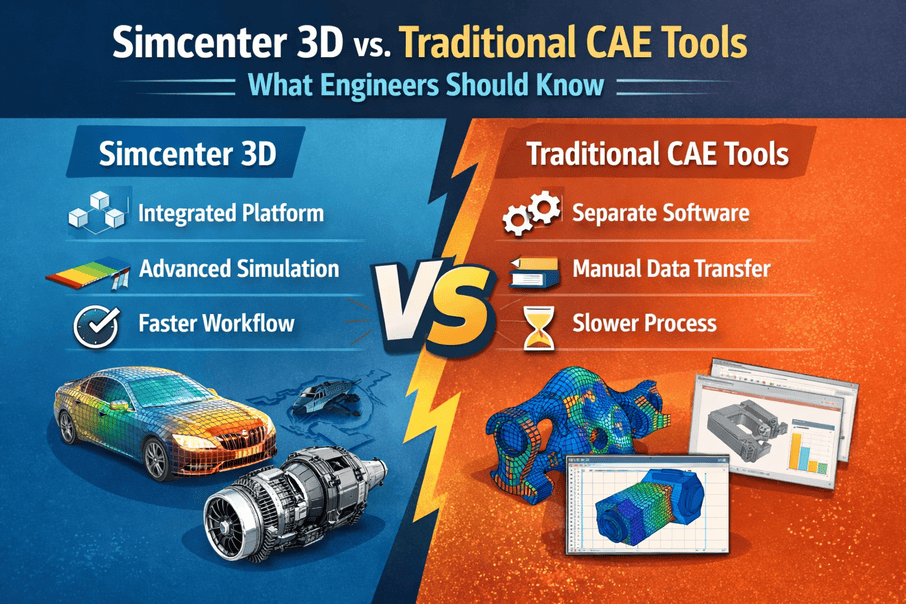
Every analyst knows the frustration of importing a CAD model into a solver. You bring the file in, hit the mesh button, and watch the software fail. You spend the next three days cleaning up broken geometry, fixing intersecting faces, and removing tiny slivers. The designer added hundreds of tiny aesthetic fillets. Your traditional mesher chokes on them. You spend hours manually defeating these features. Engineers deserve tools that work with them, not against them. A meshing failure at 4 PM on a Friday is a rite of passage, but it shouldn’t be the industry standard. Traditional tools treat design and simulation as two isolated worlds. The translation between them causes endless headaches. Let’s break down the reality of Simcenter 3D vs traditional CAE tools.
The Core Shift: traditional CAE vs modern simulation tools
Old software stacks rely on a fragmented process. You get a STEP file from the design team. You import it into your standalone pre-processor. You find errors that ruin your mesh. You start over.
Think about a standard automotive bracket. The design team changes the mounting hole locations by two millimeters. In a traditional workflow, the analyst receives a new file. They recreate the mesh and reapply boundary conditions. A simple two-millimeter change consumes half a day of engineering time. It wastes money.
A unified platform removes the translation step entirely. You work on the exact same geometry the design team uses.
The Data Problem in Engineering Simulation Software Comparison
When you evaluate isolated solvers against integrated platforms, the biggest difference lies in data management. Data translation is messy. You rely on specialized IGES or STEP translators. These translators approximate the mathematical curves of your original CAD model. The approximation causes sliver faces, overlapping edges, and gaps. Your solver demands perfect continuity. The gap between approximation and perfection consumes your engineering hours. A perfectly stitched solid in CAD might come into a traditional CAE tool with microscopic gaps between surfaces. The meshing algorithm falls into these gaps and produces millions of tiny, useless elements. Every time the base design changes, the analyst has to rebuild the simulation model.
Integrated software links the simulation model directly to the base design. If a hole diameter changes in the CAD file, your mesh updates automatically. You avoid manual remeshing.
| Feature | Traditional CAE | Simcenter 3D |
| Geometry Import | Manual STEP or IGES translation | Direct read of native CAD data |
| Design Changes | Re-import and rebuild the entire model | Automatic mesh and load updates |
| Geometry Editing | Send back to the CAD department | Direct editing with Synchronous Technology |
| Multiphysics | Export results between separate solvers | Unified environment for all physics |
Real-World Simcenter 3D Benefits for Your Team
We talk to structural and thermal analysts who spend 80 percent of their week on geometry preparation. They barely have time to analyze results. Moving to a modern platform flips that ratio. You spend more time testing the design.
Advanced CAE Tools For Engineers: Why Integration Matters
Multiphysics setups used to require three different software packages. You ran a thermal analysis, exported the temperature map, and imported it onto a structural mesh. You hoped the nodes aligned enough to get a valid result. Now, you run thermal, structural, and motion analyses in the same interface.
Specific Siemens Simcenter 3D features You Actually Use
Siemens built this platform directly on the NX core. You have native high-end geometry editing capabilities right inside the simulation environment. You skip sending the file back to the CAD department to remove a small fillet. The synchronous technology toolset is a lifesaver for simulation engineers. It recognizes geometric patterns without a history tree. You can push, pull, or delete features directly.
Here is what actually speeds up your daily work:
- Synchronous Technology: You grab a face and move it. The geometry and mesh update instantly.
- Assembly FEM (AFEM): You mesh individual components and bolt them together into an assembly. Multiple analysts can work on different parts of the same chassis simultaneously.
- Universal Connections: You define a bolted joint once. The software applies it correctly for both linear static analyses and complex motion simulations.
- Solver Flexibility: You are not locked into one solver. You prep a model here and export the deck to Abaqus, Ansys, or LS-Dyna.
CAE software comparison: Making the Call
Look at your current engineering workflow. Count the hours your team spends fixing imported geometry. Count the days lost waiting for updated CAD files. Transitioning requires training. You stop fighting the software and start engineering better products.
The main advantage is cycle time reduction. We have watched teams cut simulation preparation time in half simply by eliminating data translation errors. Shorter prep times mean you run more design iterations. Software fixes cost nothing. Fixing a problem on the manufacturing floor costs thousands.
Collaboration between departments improves. When analysts and designers use the same platform, they speak the same language.
Making the switch to an integrated platform is a major operational decision. We help companies navigate this transition every day. Adopting modern platforms lets your team focus on building better parts. If you are ready to explore better options, reach out to us at CJ Tech via cjtech.co.in.
FAQs
What is the main difference between Simcenter 3D and older simulation software?
Older software requires you to import dead geometry files. Simcenter 3D integrates directly with the CAD data. If the design changes, your simulation model updates automatically without requiring a complete rebuild.
Do we need to use NX CAD to get value out of Simcenter 3D?
No. While it works best with NX, it has excellent multi-CAD support. You can bring in files from Catia, SolidWorks, or Creo and still use the synchronous technology tools to edit the geometry for meshing.
Is it difficult for a team to transition from traditional CAE software?
There is a learning curve, especially for engineers used to isolated pre-processors. The interface is different. Once analysts understand the geometry editing tools, they rarely want to go back to their old software.
Can it handle complex multiphysics problems?
Yes. That is a core strength. You can run structural, thermal, acoustics, and motion simulations within the exact same environment.