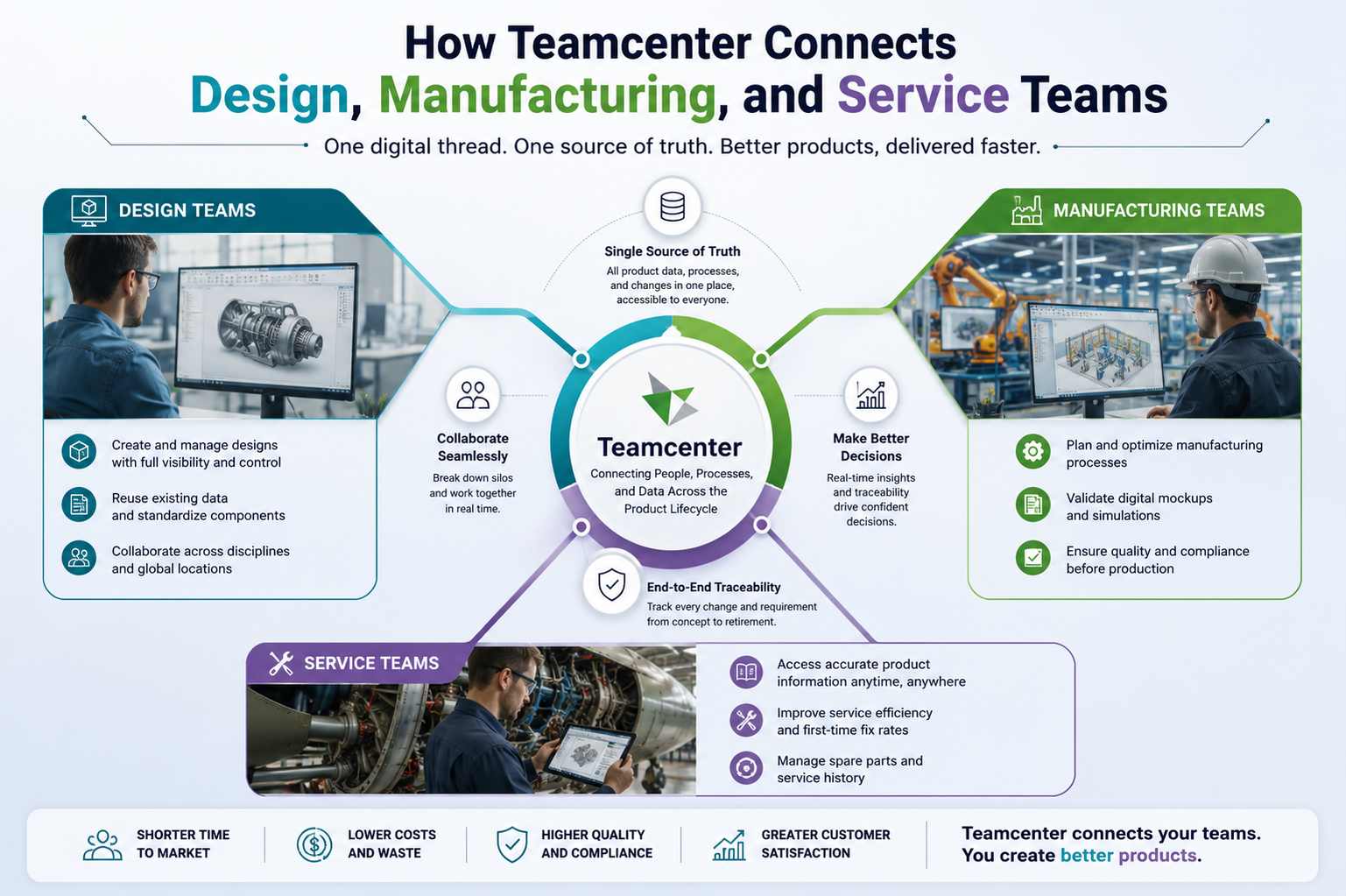
Engineering departments often operate in isolated systems. Designers draft geometry in specific CAD applications like NX or SolidWorks. Electrical engineers create wiring schematics in separate programs. Manufacturing engineers plan the assembly sequence on isolated spreadsheets. Service technicians repair the physical product using printed manuals stored in physical binders. Data gets lost when these groups do not communicate. Siemens Teamcenter solves this exact problem. It creates a single database for all product information. Mechanical, electrical, and software data live in one location. Every department looks at the exact same product information.
Integrating Teams with Siemens Teamcenter PLM software
Isolated files cause production errors constantly. A designer saves a file on a local hard drive. The factory receives an outdated PDF drawing two weeks later. The machinist cuts metal based on old dimensions. The part goes to the scrap bin. Material is wasted. Money is lost.
1. Centralizing Product Data
Finding the correct file takes hours in some companies. Engineers search through shared network folders with confusing naming conventions. They open older versions of assemblies by mistake. They spend hours modifying a part that was already updated by another team member the previous day.
Version Control Reality
Shared network folders cause constant version control headaches. Two engineers might open the identical CAD assembly before a meeting, and whoever hits save last permanently deletes the other person’s morning of work. A dedicated database prevents this entirely. It locks the active document. Anyone else trying to open that specific file receives read-only access until the first user finishes. Revisions are logged automatically. The system records the exact user and the precise timestamp for every single modification.
2. Synchronizing Engineering and Production
The engineering bill of materials rarely matches the manufacturing bill of materials. The design team focuses on how the product performs in the real world. They group parts by mechanical systems. The factory focuses on how to physically assemble the product. They group parts by the order of operations on the factory floor. These two views of the same product create confusion.
Managing the Bill of Materials
Siemens Teamcenter PLM connects the two structures directly. If design adds a new thermal sensor to the motor assembly, the software flags the missing routing step for production. Planners adjust the assembly line setup before physical parts arrive at the loading dock. Procurement orders the new sensor from the supplier automatically. The entire chain reacts to a single design change.
Connecting the Factory Floor via Siemens Teamcenter PLM
Production lines require exact instructions. Operators rely on work documents to build complex machinery. The traditional method uses paper.
3. Digital Work Instructions
Printed documents become obsolete within days of printing. Paper gets dirty or lost on the shop floor. Screens replace paper entirely. Operators look at 3D models on monitors mounted near their tooling stations. They rotate the view with a mouse. They see exactly where the bolt goes. They do not have to guess based on a flat 2D drawing.
Visual Assembly Guides
Visual guides reduce training time for new assembly line workers.
- Workers read fewer text instructions.
- They watch short animations of the physical assembly process.
- Color coding indicates which specific tool to use for a fastener.
- The system displays safety warnings before the operator begins a hazardous step.
- Operators confirm they completed critical steps directly on the touchscreen.
4. Feedback from Quality Control
When quality control finds a physical defect on the shop floor, they pin the exact issue directly to the 3D model. Say a housing clearance is too tight. The inspector logs it. The engineering team sees that specific failure report attached to the part file the next morning. They adjust the geometry for the next batch. The days of hunting down lost emails or deciphering vague phone calls disappear.
Supporting Aftermarket Operations Using Siemens PLM Software Teamcenter
Products spend years in the hands of the customer. Service technicians require accurate repair manuals. They need correct spare parts lists to perform maintenance. When the service team operates without data, repairs take longer.
5. Creating the Service Bill of Materials
Customers modify machines after delivery. Parts wear out and get replaced with different components from different vendors. Technicians access the exact configuration of the specific physical asset they are fixing. They do not look at the generic product manual from the original purchase date. They view the exact service bill of materials for that specific serial number.
Closing the Loop Between Field and Engineering
Service records contain hard data for future product designs. Engineers analyze warranty claims inside the database. They notice a specific bracket fails repeatedly under mechanical stress. The next product iteration gets a thicker bracket. The company stops paying for the exact same warranty repair.
6. Simplifying Spare Parts Ordering
A wrong part leaves a machine dead while the factory waits for another shipment. Technicians avoid this entirely. They pull up the live inventory catalog for the specific physical asset on their phones and order the correct replacement right next to the equipment.
Getting Started with Siemens Teamcenter
Implementation requires strict planning. Companies map their current workflows first. Identify where data stops moving between departments. Do not install software until the current process is understood.
7. Mapping Current Workflows
Look at the existing bottlenecks. Find the locations where employees export data to a spreadsheet just to email it to another department. Move the most critical product data into the new database first. Leave legacy data behind if it is no longer useful.
Training the Staff
Start with basic navigation. Users need to know how to search for items and view assemblies. Introduce advanced modules only after the staff is comfortable with the core interface. Training prevents users from reverting to old habits.
Many organizations struggle with isolated engineering data. The right configuration changes how your departments interact. We understand the technical requirements of these implementations. Our experts at CJ Tech map your existing processes to the new digital environment. We help your organization deploy Siemens Teamcenter PLM software effectively. Contact us to discuss your product lifecycle strategy.