Factories lose thousands of dollars every year to simple revision mistakes. A designer updates a CAD drawing on a local computer. The manufacturing floor uses an older version from yesterday. The parts get machined incorrectly. The entire batch goes straight to the scrap pile.
This is not a software issue. It is a process breakdown.
Implementing a Product Lifecycle Management system fixes this disconnect. However, over half of these installations fail to meet their original goals because companies treat them as pure IT projects.
Below, we look at the exact steps needed to get your team aligned and your data centralized.
What is PLM software and why does deployment fail?
Many manufacturers expect immediate results without changing their internal workflows. They buy a license, install it, and wait for miracles.
The reality is different. Software only automates your existing processes. If those processes are broken, the system merely speeds up your errors.
When engineers ask what is PLM software doing to improve their day, they want to hear about faster search times for parts. They do not want to hear about complex new approval steps that slow down their releases.
Failure happens when leadership imposes rigid software systems without consulting the design team. The checklist below focuses heavily on user adoption and clear database prep.
Choosing the right platform from a PLM software list
Your search likely starts with a long sheet of candidates. Sifting through options requires looking closely at how your engineering team operates.
Do you work with complex assemblies that have thousands of individual components? Or do you manage simple products with extensive variations?
Your answers will narrow down the options. Building your short PLM software list based on your factory footprint prevents you from buying features you do not need.
Structuring a PLM software list for decision makers
When compiling your options, organize the platform capabilities under specific heads.
- Compatibility with your current CAD tools.
- Ability to handle multi-site database access.
- Upgradability without breaking custom code.
- Maintenance and licensing structures over five years.
Core features of a modern PLM software solution
The basic role of the platform is to keep a single source of truth. Every bill of materials, engineering change order, and supplier document belongs in one searchable database.
When looking at a PLM software package, you must evaluate how it handles revision control. The system must prevent two users from editing the same file simultaneously.
Evaluating features of PLM software
A good platform must support visual search and easy workflow creation. If an engineer has to click through ten screens to approve a simple drawing change, they will bypass the system. We always look for direct CAD integration so designers never have to leave their main environment to check files in or out.
Establishing operational control with PLM management software
Managing the complete lifecycle means tracking a product from the initial concept sketch down to the disposal guidelines. Most companies use simple file shares for this.
Relying on legacy systems instead of active PLM management software leads to duplicated part numbers and massive waste in inventory.
Training staff on PLM management software
Software is only as good as the people operating it. We find that hands-on workshops with live production files work better than generic video tutorials.
Implementing Siemens PLM software for production lines
For companies dealing with heavy manufacturing, machinery design, or complex electronics, enterprise options are crucial.
Our integration engineers support Siemens PLM software deployments because the ecosystem connects engineering design directly to factory floor execution.
Why we recommend Siemens PLM software
We focus on tools that grow with your company. This particular suite allows teams to start with basic data archiving and scale up to full digital twin simulations when the production volumes demand it.
Transitioning to Siemens Teamcenter PLM software
When small data managers can no longer handle your growth, a complete enterprise suite becomes necessary.
We work directly with Siemens Teamcenter PLM software because we know how easily production slows down when databases get sluggish. We configure systems so engineering data loads instantly, preventing system crashes during critical release windows.
Choosing Siemens Teamcenter PLM software for scale
If your teams are split across continents, design handoffs get messy. This system allows remote teams and suppliers to view raw CAD sheets without exposing proprietary source models.
What is PLM software training value?
Without proper training, engineers will simply bypass the system and save models to their desktops. We design custom workshops so your team understands how to check files out, check them in, and release revisions without friction.
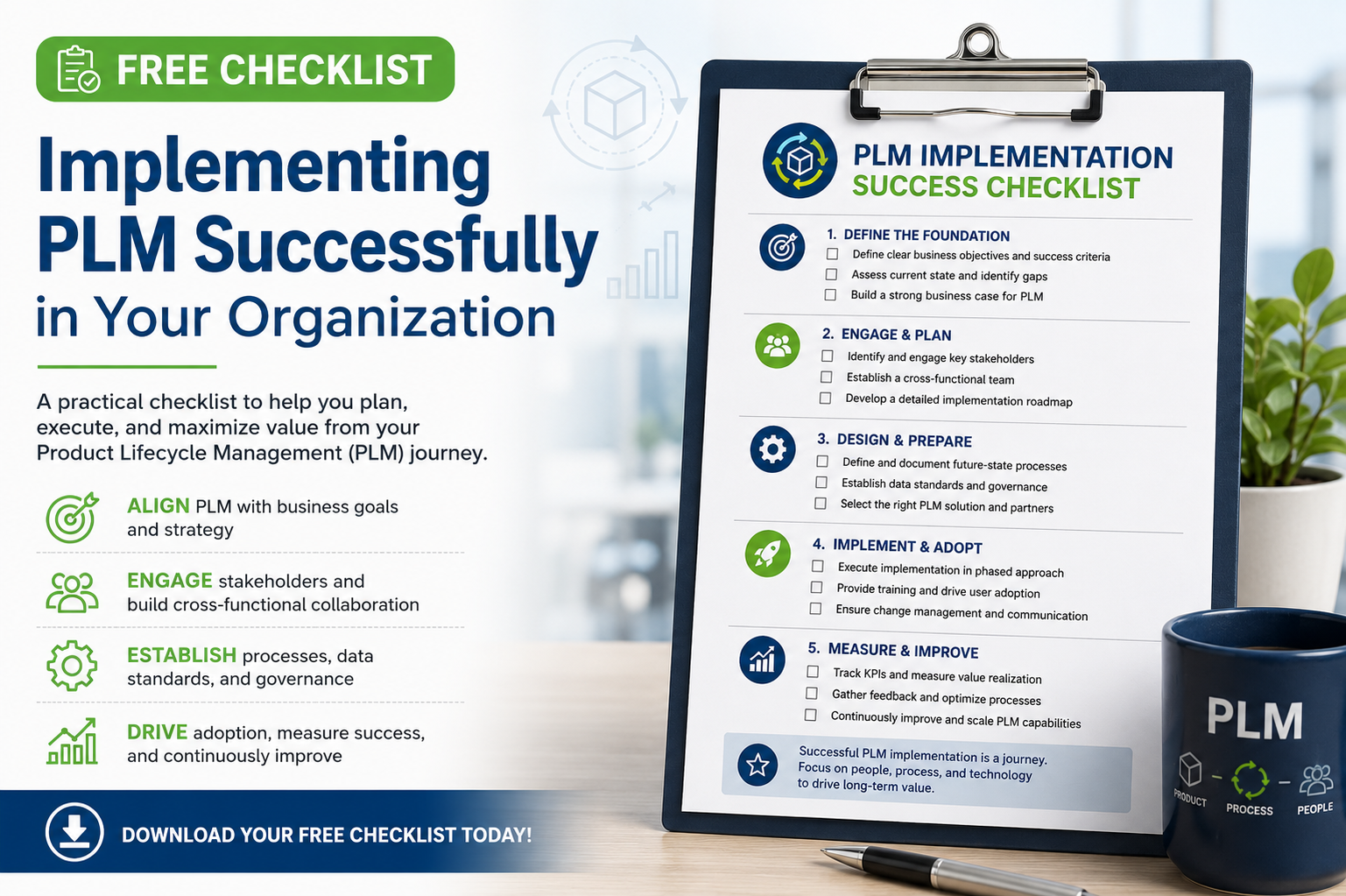
The Successful PLM Implementation Checklist
Run through these checklist points before installing anything.
1. Process Mapping and Scope
- Map your actual, day-to-day engineering change process from start to finish.
- Pinpoint who sits on approvals the longest to find the real bottlenecks.
- Keep the initial scope small. Do not try to connect your ERP on day one.
2. Data Preparation and Cleaning
- Scrub your shared drives to purge duplicate models and old legacy drafts.
- Force a unified naming standard across all active part files.
- Audit your active bills of materials to ensure they match what the assembly line actually uses.
3. Team Alignment and System Design
- Put an engineer in charge of the launch, not an IT manager who does not design parts.
- Lock down permissions so only release managers can approve final models.
- Write quick, repeatable tests to prove the software works at every stage.
4. Deployment and Review
- Test the system on one simple product family first before changing everything.
- Ask shop floor assembly workers for feedback, not just CAD designers sitting in offices.
- Fix system friction based on real user struggles before scaling to the entire plant.
FAQs
How long does a typical implementation take?
For a medium-sized manufacturer, a basic installation takes three to six months. Trying to rush this process usually leads to dirty data entering the new system, which ruins user trust immediately.
Should we connect our PLM and ERP systems right away?
No. We advise clients to get their design files and revision controls stable first. Once your engineers are comfortable releasing change orders without errors, you can look at connecting the database to your enterprise resource planning system.
How do we handle legacy CAD data?
Do not try to migrate every file you have created over the last twenty years. Only import active product lines. Keep your old archives on a read-only server for reference when you need to rebuild older assemblies.
Successfully deploying with your integration partner
A successful system deployment requires deep technical knowledge and a realistic approach to factory workflows. At CJ Tech, we do not just sell software licenses. We work alongside your engineering teams to build a clean, reliable data structure that keeps your shop floor running without costly errors. Learn more about our technical services at CJ Tech