If you’ve spent even a week researching product lifecycle tools, you already know the problem. Every vendor claims to be the fastest, the most scalable, the easiest to roll out. So how do you actually figure out which PLM software is best for your business, not just the sales pitch?
There’s no single right answer for every company. But there is a right answer for yours, and it comes down to how well a platform fits your engineering workflow, your team size, and the systems you already run. This guide breaks down what to look for, how the major players stack up, and where a Siemens-backed platform like Teamcenter earns its reputation.
What Is a PLM System and Why It Matters
A product lifecycle management system manages a product’s entire journey, from the first sketch to the last service record. It holds your CAD files, tracks revisions, manages the bill of materials, and keeps engineering, manufacturing, and quality teams working off the same version of the truth.
Without it, most manufacturers end up with a mess of shared drives, email chains, and spreadsheets that go stale the moment someone forgets to update them. That’s expensive. A part gets built to the wrong revision, a supplier gets an outdated drawing, and suddenly a small mistake turns into a recall or a missed deadline.
A good PLM platform removes that risk. It gives you one place for product data, clear change control, and a record of who did what and when. For growing manufacturers in India, that kind of traceability isn’t optional anymore. Automotive and aerospace customers expect it, and audits demand it.
How to Judge Which PLM Software is Best for You
Before comparing vendors, get clear on what you actually need. A few questions worth answering first:
- How many engineers, designers, and reviewers will touch the system daily?
- Does it need to connect with your existing CAD tool, or replace it?
- Are you managing mechanical parts only, or electronics and software too?
- Do you need cloud deployment, on-premise, or a mix of both?
- What’s your realistic budget for licensing, implementation, and training?
Your answers will narrow the field fast. A ten-person design shop and a 500-engineer automotive supplier don’t need the same setup, even if both are technically shopping for the same kind of tool.
Core Features to Compare
Once you know your requirements, look closely at these areas across any shortlist:
| Feature | Why it matters |
| CAD integration | Determines how smoothly design data flows into the system |
| Change management | Controls how revisions, approvals, and releases are tracked |
| Scalability | Decides whether the platform grows with your team |
| Supplier collaboration | Affects how easily you share data outside your own walls |
| Reporting and audit trails | Matters most during compliance checks and customer audits |
Don’t just read the feature list on a vendor’s website. Ask for a demo built around your actual parts and your actual workflow. That’s where the real differences show up.
Comparing the Leading PLM Platforms
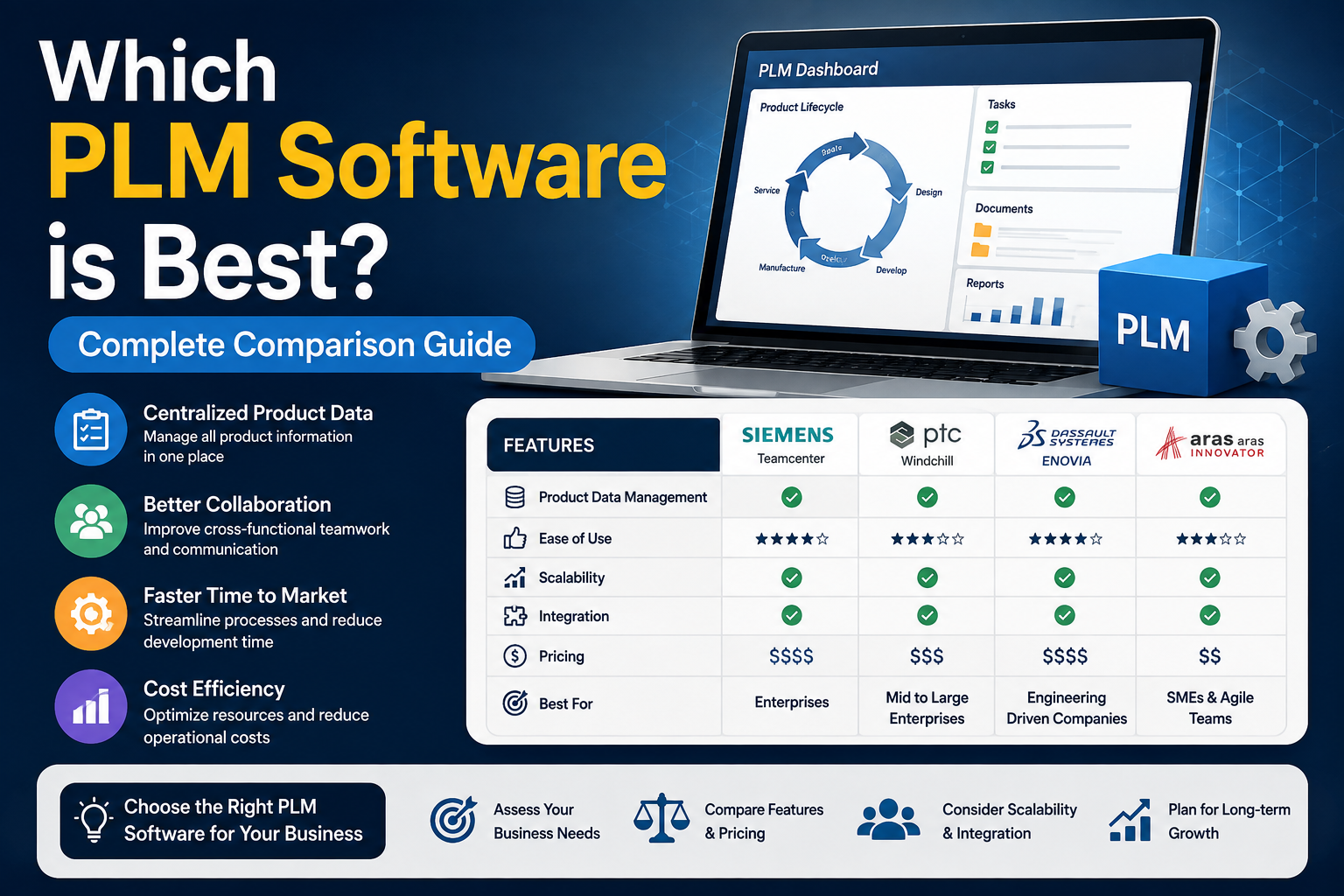
Here’s a practical look at how the major options in the market generally compare.
Siemens Teamcenter is built for manufacturers who need deep CAD integration, strong change control, and the ability to scale from a single site to a global operation. It connects natively with NX and Solid Edge, which makes it a strong fit if your design team already works in the Siemens ecosystem.
PTC Windchill is worth a look if your team already designs in Creo. The two are tightly linked, and Windchill’s configurability lets you adapt workflows without waiting on a vendor for every tweak.
Dassault’s ENOVIA leans toward large aerospace and automotive players running CATIA. It’s powerful, but mid-sized teams often find the implementation heavier than they bargained for, so go in with realistic timelines.
Then there’s the cloud-native crowd, Autodesk Fusion Manage and Arena PLM among them. Faster to set up, lighter on upfront cost, and a solid fit for smaller teams. Just don’t expect the same depth once your product line spans multiple sites or gets genuinely complex.
None of these are wrong choices. The right one depends on your existing CAD investment, your industry’s compliance demands, and how much complexity your product line actually has.
Which PLM Software is Best for Indian Manufacturers?
For manufacturers already running Siemens NX or Solid Edge, Teamcenter tends to be the natural next step. The integration between design and data management is direct, so engineers aren’t stuck exporting and re-importing files between disconnected systems.
Teamcenter also holds up well for companies with strict supplier and OEM requirements, which describes a large share of India’s automotive, rail, and industrial manufacturing base. It handles multi-site collaboration, revision history, and audit trails in a way that satisfies both internal quality teams and external customers like Tier 1 automotive buyers.
That said, Teamcenter is a serious platform, and it deserves a proper rollout plan. Rushing implementation without the right partner is where most PLM projects lose momentum.
Making the Final Call
There’s no shortcut to picking the right system. Shortlist two or three platforms, run a pilot on real parts, and involve the engineers who’ll use it every day, not just management. Ask vendors hard questions about implementation timelines, training support, and what happens after go-live.
If your team already works in Siemens NX or Solid Edge, or you’re weighing whether to standardise your CAD and product data management under one vendor, it’s worth getting a proper assessment before you commit. We at CJ Tech have spent over 15 years helping manufacturers across India implement and get real value from Siemens Teamcenter, and we’re happy to walk you through what a rollout would actually look like for your team.
Frequently Asked Questions
How long does a typical implementation take?
It varies with company size and complexity, but a mid-sized rollout usually takes a few months from planning to go-live. Simpler deployments can move faster; multi-site implementations take longer.
Can this kind of platform integrate with our existing ERP system?
In most cases, yes. Platforms like Teamcenter are built to connect with major ERP systems, so product data and business data stay aligned without manual re-entry.
Is cloud-based deployment as reliable as on-premise?
Cloud deployment has matured considerably and now suits many mid-sized manufacturers well. On-premise still appeals to companies with strict data residency needs or heavy customisation requirements.
Do small manufacturers really need a system like this, or is it just for large enterprises?
Even small teams benefit once they’re managing more than a handful of active projects. The earlier you build good data discipline, the less rework you face as you scale.