A machinist opens the drawing, then opens the 3D model, and finds they disagree on a hole position. Now someone has to stop the job, call the designer and work out which file is right. That small delay repeats across thousands of parts every year.
MBD in manufacturing closes that gap by placing dimensions, tolerances and notes directly on the 3D model, so the model itself becomes the instruction. Below, you will find how model-based definition in engineering differs from 2D drawings, what PMI holds, how a model carries design intent to the shop floor, what your team gains, where implementation gets difficult and how CAD and PLM tools fit in. The definition comes first.
What Is Model-Based Definition (MBD)?
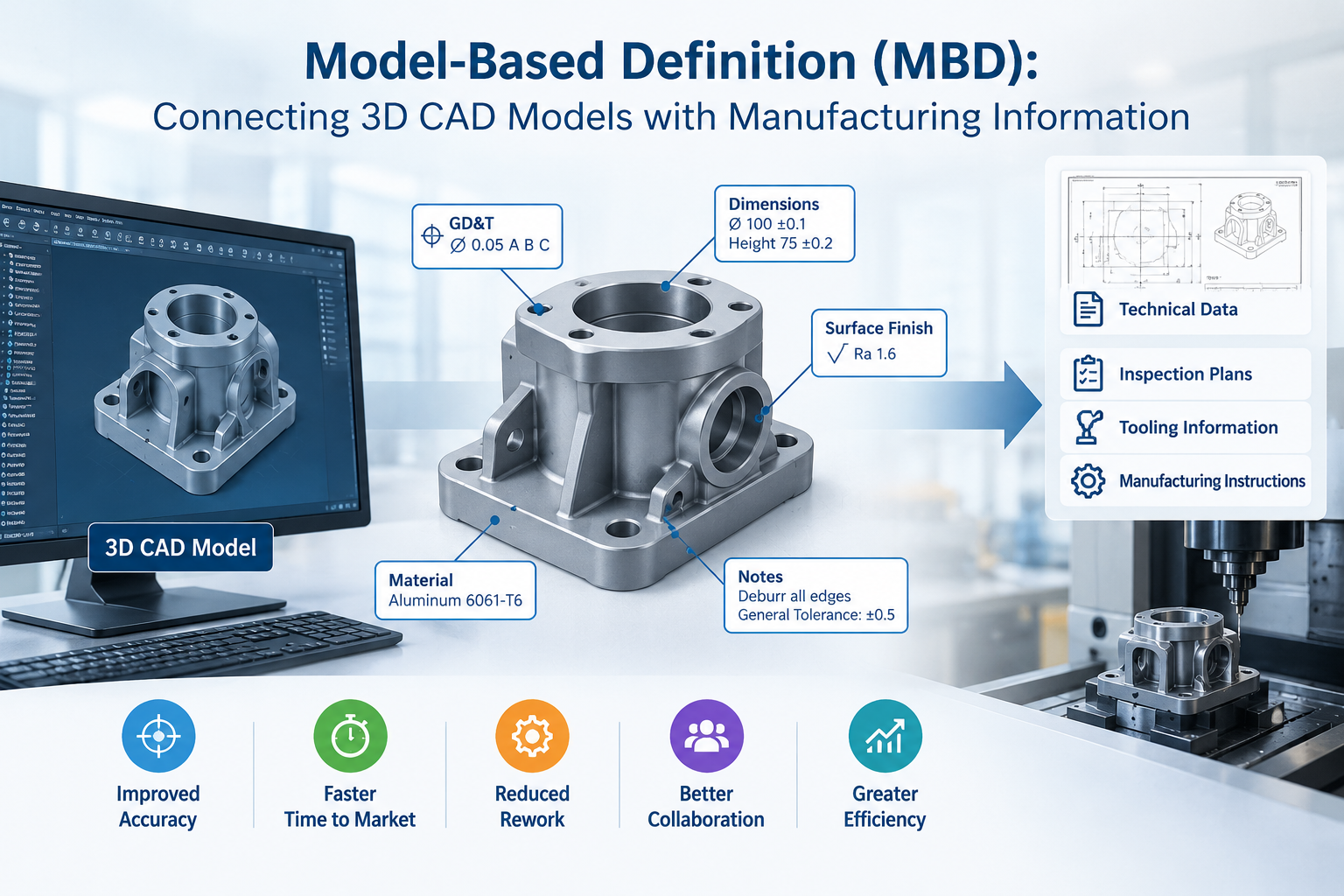
It is a way of describing a product where an annotated 3D CAD model, not a 2D drawing, is the authoritative source of design information. The model holds the shape of the part and everything a manufacturer needs to make it: dimensions, tolerances, surface finish, material and notes.
The wider term is digital product definition, meaning the full set of data that describes a part. Standards such as ASME Y14.41 and ISO 16792 set the rules for how that data should be created and presented.
A well-built MBD model typically carries:
- Solid geometry that is accurate enough to manufacture from
- Annotations such as dimensions, GD&T and surface finish symbols
- Attributes like material, revision, part number and mass
- Saved views that show the right callouts to the right reader
Aerospace, defence and automotive firms adopted the approach early. Machine builders and component makers now use it too, usually starting with the parts that cause the most rework.
How MBD Differs from Traditional 2D Engineering Drawings
A traditional drawing asks the reader to build the part in their head from flat views and sections. A 3D model-based product definition skips that step. You rotate the part, pick a feature and see its requirements attached to it.
| Aspect | 2D drawing | MBD |
| Source of truth | Drawing plus a separate model that can drift | One annotated model |
| Reading the part | Reader reconstructs 3D from views | Reader inspects the part directly |
| Tolerance data | Drawn symbols that only humans read | Can be machine-readable |
| Design changes | Update the model, then every drawing view | Update the model once |
| Reuse downstream | Re-keyed into CAM and inspection tools | Read directly where tools support it |
| Sheet effort | View layout, sections, dimension placement | Annotations tied to features |
Drawings don’t vanish overnight. Some contracts, audits and regulators still ask for them, so many teams run both for a while and shrink the drawing role step by step.
What Is Product Manufacturing Information (PMI)?
Product manufacturing information, or PMI, is the non-geometric data attached to a 3D model that tells manufacturing and inspection how to make and verify the part. Geometry says what shape you want. PMI says precisely, with what finish and to which reference points.
In practice, 3D product manufacturing information includes:
- GD&T feature control frames and datum features
- Linear, angular and radial dimensions with tolerances
- Surface finish and thread callouts
- Weld symbols
- Notes on material, heat treatment, coating or part marking
PMI in CAD comes in two forms, and the difference matters. Graphical PMI looks like an annotation on screen, but only a person can read it. Semantic PMI is tied to the feature it describes, so software can read the tolerance value, the datum reference and the feature type. Automation depends on semantic PMI. Neutral formats such as STEP AP242 can carry it between systems.
How 3D Models Communicate Design and Manufacturing Requirements
Take a flange with eight bolt holes. In the model, each hole carries its diameter and a position tolerance referenced to datums A and B. Nobody redraws that information for the next department. It travels with the part.
Here is how a model usually moves through a company:
- The designer builds the solid and applies PMI. Saved views group the 3D product manufacturing information by purpose, such as machining, inspection or assembly, so nobody faces a cluttered screen.
- The model is released through PLM, which locks the revision and records who approved it.
- Manufacturing engineers open it in CAM. Where the software supports it, hole sizes and tolerances guide tool selection and toolpaths.
- Quality planners build the inspection plan from the same PMI. A CMM program checks measured points against the nominal model.
- Suppliers receive a neutral package, often STEP AP242, JT or a 3D PDF, so they don’t need your CAD licence.
Each step reads the same source. That is where model-based definition in engineering earns back its setup time.
Benefits of Model-Based Definition for Engineering Teams
MBD in manufacturing pays back in hours you stop spending on tasks that never added value to the product. The gains most teams report:
- One source of truth, so the model and its drawing can’t disagree
- Less drawing work, since you skip view layout, sections and dimension placement on every sheet
- Fewer misreadings, because the shop floor sees the part itself
- Faster CAM programming and inspection planning when the PMI is semantic
- A cleaner supplier handoff, with one package in place of a model, a drawing and a pile of emails
- Simpler change control: revise the model once and release it
Think of a change order where a hole moves by 2 mm. With drawings, someone updates the model, then three views and a section, then checks each one again. With MBD, the callout follows the feature and you release one file.
One honest caveat. These gains grow with every downstream tool that reads the model. If your team exports PMI to a PDF and then retypes the numbers into CAM, you capture only part of the value.
Common Challenges in MBD Implementation
Moving to a 3D model-based product definition takes more than new software.
- Supplier readiness: Some suppliers can’t open 3D data yet. You may need to send a drawing alongside the model for a while.
- Skills: Annotating a model exposes loose tolerancing fast. Your engineers need solid GD&T knowledge under ASME Y14.5 or ISO GPS.
- Translation losses: Semantic PMI can degrade when a model passes through a neutral format. Test a round trip on real parts before you commit.
- Contracts and audits: Some agreements and regulators reference drawings, and long-term archiving rules may apply to the model too.
- Screen clutter. Without saved views, a fully annotated part is unreadable.
- Model quality: When the model is the master, a sloppy surface or a missing feature goes straight to the machine.
- Process change: Release workflows and sign-offs built around drawings need rewriting.
Pick one part family for a pilot. You’ll learn where your gaps are with little risk.
How CAD and PLM Tools Support Model-Based Definition
PMI in CAD tools such as Siemens NX and Solid Edge lets designers add GD&T, dimensions and notes straight onto features, and keep them linked when the geometry changes. Saved views then control what each reader sees.
Releasing that model safely is a PLM job. Teamcenter PLM holds the digital product definition under revision control, manages approvals and lets people view lightweight 3D data without opening the full CAD file. That matters for the planner, the buyer and the quality inspector who never touch a CAD seat.
When you compare tools, check whether they:
- Create semantic PMI, not only graphical callouts
- Check annotations against standards
- Export STEP AP242 or JT with PMI intact
- Pass PMI into CAM and inspection software
- Give shop-floor users a simple 3D viewer
At CJ Tech, we are a Siemens partner and help manufacturers across India set up NX, Solid Edge and Teamcenter around their actual parts and suppliers. If you want to plan an MBD pilot, talk to us and we will look at your workflow with you.