Why do minor engineering revisions push project deadlines back by an entire week? You finish a complex assembly, submit it for review, and a single tolerance change forces you to manually update 50 associated parts. This is a daily bottleneck in product development. We see engineering teams spend more time rebuilding broken geometries than actually designing.
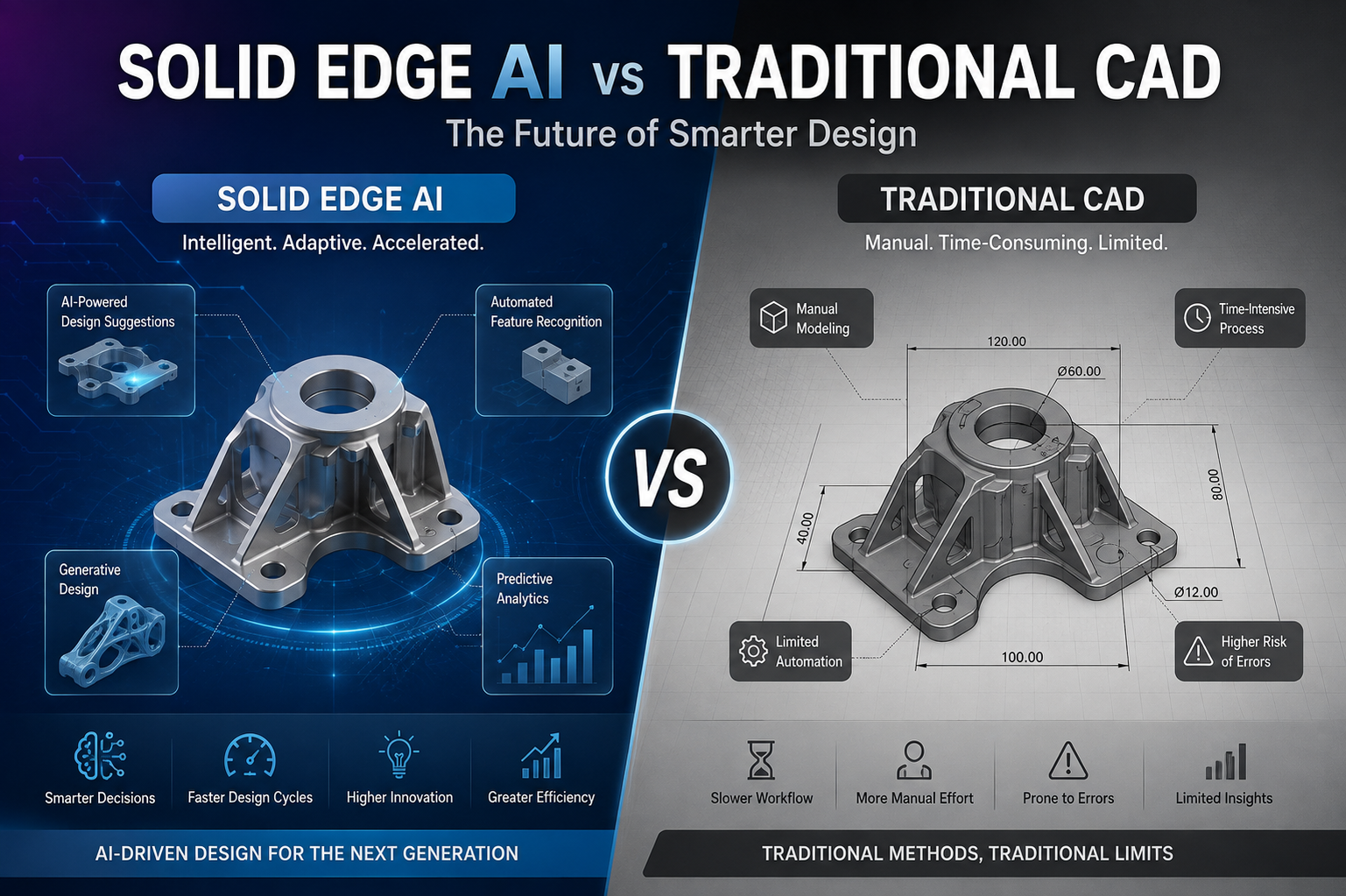
The debate around Solid Edge AI vs Traditional CAD stems directly from this problem. Teams are tired of rigid systems dictating their engineering speed.
Core Workflow Differences
Traditional drafting tools rely on explicit, linear commands. You tell the system exactly what to do at every step. If you need a chamfer, you click the edge and type the parameter. The software does not think ahead. You act as the sole driver of the design.
Solid Edge AI changes this interaction entirely. It predicts your next move based on the geometry you just created. We integrate these systems for manufacturers, and the immediate outcome is fewer mouse clicks per task. The interface adapts to your current operation, pulling the most relevant commands to your cursor.
Are you wasting hours recreating similar parts? AI CAD software recognizes patterns in your design history. It suggests reusable components before you start sketching from scratch. You stop designing the exact same bracket your colleague made three years ago.
Where Standard CAD software Creates Drag
A typical mechanical design process hits friction during modifications. Older systems use a strict history-based feature tree. When you delete a feature early in that tree, subsequent features fail. You then spend hours fixing red errors in the feature manager just to widen a hole by two millimeters.
The issue is rigid software architecture. You are constrained by the exact sequence the original designer used years ago. This restricts collaboration. When an engineer inherits a file from someone else, they have to decipher the logic of the feature tree before making a single edit.
How AI in CAD Handles Geometry
Synchronous technology allows you to grab a face and pull it to adjust dimensions. You do this without worrying about the order of creation. The artificial intelligence evaluates the design intent in real-time. It maintains symmetry and coplanar relationships automatically.
We often transition clients from legacy platforms just to access this specific capability. It cuts down revision time heavily. You edit the 3D model directly, much like molding clay, rather than writing a script of commands.
Quantifying the Shift to Predictive Modeling
Let’s look at standard industry observation metrics when upgrading design tools. The data shows distinct operational changes on the shop floor.
| Design Task | Older System | Predictive Modeling | Typical Outcome |
| Part Modification | 45 minutes (rebuilding tree) | 5 minutes (direct edit) | Faster engineering change orders |
| Drawing Generation | Manual view placement | Automated layout | Less documentation time |
| Finding Past Parts | Manual folder search | Shape search & pattern matching | Higher part reuse |
| Assembly constraints | Manual face-to-face mating | Auto-recognition of hardware | Quicker assembly builds |
| Sheet Metal Flat Patterns | Manual bend calculations | Automated relief and unbending | Reduced scrap material |
Is CAD software with machine learning necessary for your team?
It depends on your production volume. If you design simple, static components, legacy methods might suffice. If you manage assemblies with thousands of parts and frequent client revisions, predictive modeling prevents bottlenecks. The time saved per engineer scales rapidly across an entire department.
Practical Applications of AI CAD software
How do you handle reverse engineering from a mesh model?
Importing scan data into standard programs usually results in a dead, uneditable block. You end up remodeling the entire thing from a blank screen. It is tedious and prone to deviation errors.
Solid Edge AI fits analytical surfaces directly over the mesh. It identifies planes, cylinders, and spheres without manual tracing. You get a workable solid body in minutes. This drastically speeds up aftermarket part creation.
We see this impact other areas of manufacturing too:
- Predictive User Interface: The command ribbon changes dynamically based on the task you are currently performing. You spend less time hunting for tools in hidden dropdown menus.
- Generative Design: You set the mounting points and apply the maximum load. The system strips away any material that does not directly carry weight. We configure this specific function for heavy machinery manufacturers who need to shave pounds off large assemblies to cut shipping costs. You get a part that uses less raw material but survives physical stress tests on the first try.
- Automated Routing: Running hydraulic lines or wire harnesses through a packed machine chassis often results in physical collisions on the assembly floor. You spend hours tweaking a single cable path just to clear a motor block. The software calculates the spatial clearance for you. It places the route along the shortest safe path, entirely avoiding the hardware you already built.
- Costing modules: As you model, the software estimates manufacturing costs based on material usage and machining time. You quote jobs faster and with higher accuracy.
The Reality of System Migration
We evaluate the transition for our clients based on pure output speed. The learning curve exists. Engineers used to strict history trees struggle initially with direct editing. They want to plan every step. Once they adapt, the turnaround time for custom orders drops. You stop fighting the interface and start engineering products.
Why wait to upgrade your AI in CAD tools?
Competitors quote jobs faster because their design process is automated. Delaying the adoption of intelligent tools keeps your overhead high. We help businesses audit their current workflows to identify where predictive tools cut waste.
The choice between intelligent systems and legacy methods comes down to survival in a tight market. Your team needs to focus on product innovation, not fixing broken mates in a feature tree. Upgrading your systems removes the manual repetition from the design cycle. If you are ready to modernize your engineering department, we can map out the exact deployment phases. Reach out to our CJ Tech team to get a detailed AI CAD tools for your software implementation project.
Frequently Asked Questions
Why does our engineering team spend more time fixing broken model trees than designing new parts?
That comes down to how legacy CAD software handles parent-child relationships. When someone edits an early sketch, everything downstream breaks. With Solid Edge AI, you edit 3D geometry directly, no broken feature trees, no rebuilding errors, and no wasted hours untangling someone else’s file logic.
How much time will my team actually save when switching to AI CAD software?
For daily modifications, design revisions drop from hours to minutes. In a direct head-to-head evaluation of Solid Edge AI vs Traditional CAD, routine tasks like updating sheet metal bends or replacing standard hardware take roughly 70% fewer clicks because the system predicts your next step.
Will our draftspeople have to relearn how to model if we adopt AI in CAD?
Not from scratch. The core engineering principles stay identical. What changes is the mechanical repetition; you stop manually placing constraints and typing redundant dimensions. Most design teams we train pick up the predictive interface within two weeks.
How does Solid Edge AI handle messy, imported STEP files or 3D scans from suppliers? Standard programs treat imported geometry as dead blocks you have to manually trace over. Solid Edge AI fits clean, editable analytical surfaces directly onto the mesh scan automatically. You get a workable solid model you can modify on the spot.
Is upgrading to AI in CAD worth the investment for a mid-sized machine shop?
If you handle custom orders or frequent client change requests, absolutely. Older CAD software slows down your bidding speed and eats into margins when revisions stack up. Modern AI CAD software cuts engineering overhead so you quote faster and deliver projects without production delays.